Embark on a humorous yet heartfelt journey into the chaotic world of DIY computer upgrades. From tangled wires and elusive screws to compatibility surprises, this work captures the unpredictable nature of tinkering with hardware. It reveals that what begins as a straightforward speed boost often transforms into a messy, laughter-inducing adventure filled with troubleshooting marathons and small victories. Will you find humor in the missteps and patience amid the clutter? This narrative challenges you to embrace the chaos, turning frustrations into lessons of resilience and ingenuity. Through relatable scenes and troubleshooting strategies, it illustrates how every tangled cable and mistake becomes part of a memorable story—proof of growth and determination. Ready to navigate the delightful disorder of your own tech upgrade? Discover that in chaos, there’s opportunity for humor, learning, and genuine accomplishment.

Embrace the Chaos: The Humorous Side of DIY Tech Upgrades
Ever since computers became a staple in our daily lives, the idea of upgrading them has been both tempting and inevitable. Whether it’s boosting processing speed, adding more storage, or just giving the case a fresh coat of paint, most of us have thought about tinkering with our machines. The appeal lies in the sense of control—taking a generic setup and making it uniquely yours. It’s satisfying to think, “I built this,” even if the process sometimes feels more like assembling furniture without instructions.
People dive into DIY upgrades for the thrill of independence and accomplishment. There’s a certain pride in swapping out a hard drive or installing new RAM, knowing you’ve handled complex components yourself. It’s about more than performance; it’s about proving to yourself that you can troubleshoot, learn, and adapt. Plus, it’s often cheaper than buying a new system, and you get that rewarding feeling of customizing exactly what you want.
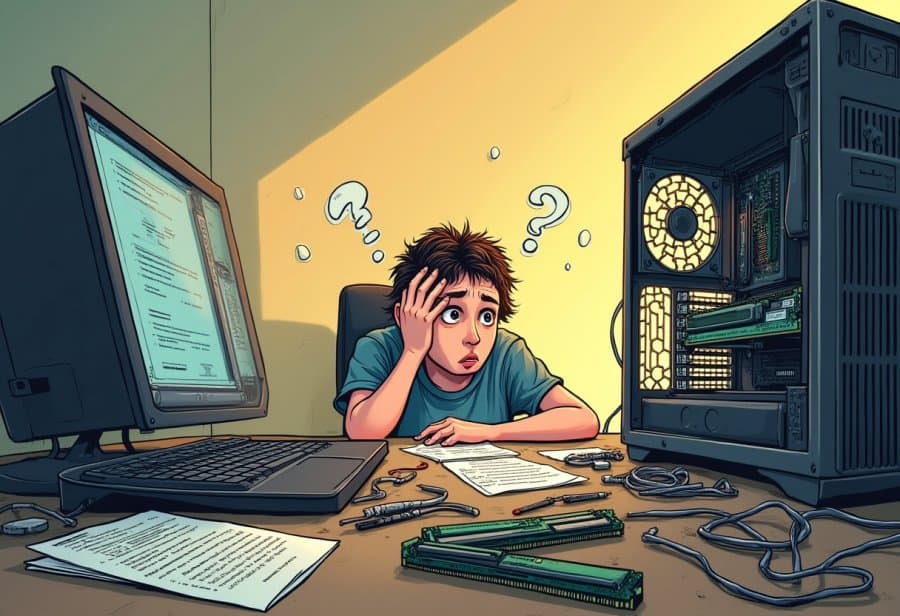
But let’s be honest: the reality often doesn’t match the neat, confident picture most imagine. Instead, it’s more like stepping into a workshop after a tornado has passed through. You’ll find a cluttered desk covered in parts—shiny new RAM sticks, a graphics card, tiny screws that seem to vanish into thin air—and a toolbox that’s seen better days. Cables snake around everything, looping and twisting like a bowl of spaghetti, making even simple tasks feel like a wild puzzle.
The process is rarely quick or straightforward. What should be a simple swap can turn into hours of troubleshooting, especially when things don’t go as planned. Maybe a component doesn’t fit, or a cable isn’t plugged in quite right—small mistakes that lead to big headaches. Sometimes, static discharge or compatibility issues cause unexpected setbacks, transforming what should be an upgrade into a frustrating game of trial and error.
Despite the chaos, there’s a strange humor in the mess. Witnessing your workspace turn into a mini disaster zone is almost comical—tools everywhere, wires tangled beyond recognition, and a sense that your computer is conspiring against you. Yet, each small victory—like finally seating a stubborn RAM stick or making the system recognize a new drive—feels like a major win, turning frustration into satisfaction.
Overall, DIY tech upgrades are as much about patience and humor as they are about hardware. Embracing the chaos, laughing at mistakes, and learning from mishaps make the whole journey memorable. It’s a reminder that sometimes, the best part of upgrading your computer isn’t the speed boost but the stories you’ll tell afterward.
Inside the Cluttered Workshop: The Anatomy of a Tech Upgrade Disaster
A typical DIY tech upgrade scene looks more like a cluttered workshop than a sleek workspace. Scattered across the desk are shiny new hardware parts: RAM sticks, solid-state drives, a graphics card, and tiny screws that seem to vanish into thin air. Tools like screwdrivers, anti-static wrist straps, and plastic pry tools are strewn about, often in a chaotic jumble. Cables snake across the surface, twisting and looping in a tangled web that resembles a bowl of spaghetti. The motherboard is propped at odd angles, with fingers hovering over delicate pins and slots, trying to figure out where each piece fits. It’s a scene filled with clutter, confusion, and a sense of organized chaos.
Inside this mess, the hardware itself feels like a treasure hunt. Each component—more RAM, faster storage, a beefier graphics card—comes with its own quirks. Some require specific power connectors; others need to fit into tight spaces. Manuals, often filled with technical jargon, add another layer of complexity, making you feel like you’re deciphering an alien language. Tools are just as crucial as parts, with different screwdrivers for different screws, and anti-static straps that often end up tangled or forgotten in a drawer. The process demands patience and a gentle touch, especially when handling fragile chips and delicate connectors.
Once you open the case, the real spaghetti chaos begins. Wires from the power supply, hard drives, case fans, and front panel ports twist and loop in all directions. These cables, often too long or poorly managed, form knots and loops that make troubleshooting feel like unraveling a giant ball of yarn. Trying to replace a component or diagnose a connection can turn into a game of patience—carefully tracing each wire’s path without causing more tangles. Sometimes, a misplaced cable or a loose connector results in system failures or boot issues, turning a straightforward upgrade into a troubleshooting marathon.
Getting hardware installed isn’t always straightforward. RAM sticks might be inserted at awkward angles, or the graphics card might refuse to seat properly. Compatibility issues crop up, especially with size constraints or unsupported BIOS versions. Static discharge is a sneaky culprit—one tiny zap can fry a sensitive chip, turning a promising upgrade into a costly mistake. These errors often lead to hours of frustration, swapping parts and rechecking connections, all while the clutter grows and tempers fray.
The scene often resembles a disaster zone, with tools, screws, and cables scattered everywhere. A single misstep—like knocking over a screwdriver or losing a tiny screw—can set off a chain reaction of chaos. Sometimes, a component is installed upside down or a cable is plugged in the wrong port, causing the entire system to refuse to boot. These moments are frustrating but almost comedic in hindsight. They highlight how easily a simple upgrade can turn into a puzzle, requiring patience, a steady hand, and a good sense of humor.
Despite the mess, there’s an odd sense of satisfaction in managing this chaos. Every tangled wire untangled, every loose screw tightened, feels like a small victory. Troubleshooting these issues becomes a puzzle-solving exercise, and each successful fix boosts confidence. Over time, the clutter becomes a badge of honor—proof that you’ve taken on a challenge and learned something new. The process is messy, unpredictable, and often hilarious, but that’s part of what makes DIY upgrades so memorable.
Tech Fails Turn Comedy: The Hilarious World of Computer Repair
Fixing and upgrading computers often feels like starring in a comedy show with no script. One moment, everything seems to be going smoothly—tools in hand, a confident smile—and the next, a mysterious error pops up or the system simply refuses to turn on. It’s as if your computer has a mind of its own, throwing curveballs just to keep you on your toes. Maybe you accidentally unplug the wrong cable or forget to tighten a screw, only to realize hours later that your mistake was the culprit all along. These moments turn routine tasks into episodes of tech slapstick that you’ll laugh about long after the chaos subsides.
There’s a special humor in hardware misbehaving. Trying to install a new graphics card, only to discover it’s upside down or doesn’t quite fit, can quickly devolve into a comedy of errors. Spending ages carefully inserting RAM sticks, only to find out they weren’t seated properly, and then discovering the system still won’t recognize them—these are classic scenes. Sometimes, a system crash or a blank screen feels like your computer is playing a prank on you, reminding you that even the most careful builders can stumble into a comedy of mistakes. It’s frustrating, but the absurdity often makes it easier to laugh at the situation.
Many “tech fails” follow a familiar pattern: forgetting to plug in a critical power cable, installing a component at an awkward angle, or static shocks zapping a delicate chip. Each mishap turns what should be a quick upgrade into a troubleshooting marathon. Knocking over a screwdriver or losing a tiny screw only adds to the comedy. These errors often lead to hours of swapping parts, rechecking connections, and scratching your head—yet they also serve as humorous reminders of how easily a simple fix can spiral into a full-blown fiasco.
Troubleshooting these mishaps is like unraveling a giant ball of yarn. You crawl inside the case, cables in hand, trying to untangle a web that seems to have a life of its own. Every fix can trigger another problem—dislodged wires, crossed connections, or misplaced screws—making the workspace look more like a disaster zone than a tech lab. Patience and a good sense of humor are your best allies here. Sometimes, stepping back to laugh at the chaos helps you reset and approach the problem with fresh eyes, turning frustration into a funny story later.
Despite all the setbacks, there’s a strange joy in overcoming these misadventures. Each tangled cable and failed attempt becomes part of the story you’ll laugh about later—proof that you took on a challenge and learned something new. These moments of failure aren’t just frustrating—they’re lessons in disguise, teaching patience, problem-solving, and resilience. Embracing the chaos with humor transforms what seemed like disasters into badges of honor, making the process memorable and even fun. After all, in the unpredictable world of DIY tech repair, it’s the stories of mishaps that make the journey truly rewarding.
Mastering the Mayhem: Strategies to Navigate and Learn from Tech Upgrade Disasters
When your DIY tech upgrade spirals into chaos, the best approach is to stay calm and methodical. Instead of rushing to swap parts or yank tangled cables, take a deep breath and step back. Clear-headed troubleshooting is more effective than frantic tinkering, which often makes things worse. Start by assessing what’s wrong—check for loose connections, incompatible parts, or static shocks—and make a simple checklist of what you’ve tried so far. This prevents you from going in circles and helps identify the next logical step.
Leaning on online forums, tutorials, and troubleshooting guides can save hours of frustration. Chances are, someone else has faced a similar mess and shared a solution. Reading through these resources patiently can reveal overlooked steps or helpful tips, like resetting the BIOS or verifying power connections. Keeping a sense of humor helps too—seeing setbacks as part of the process makes it easier to stay relaxed and focused on fixing the issue.
Preparation is key before you start. Organize your tools, manuals, and parts so everything is within reach. Carefully review compatibility specs for your components to avoid surprises later. Using small containers for screws and tiny parts keeps track of everything and prevents losing critical pieces. Handle delicate components gently, and take your time with each step. Rushing often leads to bent pins or crossed wires, making problems even harder to fix.
When problems crop up, treat troubleshooting like solving a puzzle. Break down the issue into manageable parts—check connections first, then update firmware or reseat components. If you hit a wall, don’t hesitate to ask for help in online communities. Experienced builders are often happy to share advice or walk you through tricky steps. Patience and persistence help prevent mistakes that could escalate the chaos.
Learning from each mistake builds your skills and confidence. After resolving an issue, reflect on what caused it—be it a loose cable, static discharge, or incompatible hardware. Documenting these lessons streamlines future upgrades and reduces repeat errors. Over time, you’ll develop a better sense of what to watch out for, making the process smoother and less stressful.
Accept that chaos is part of the journey. Every tangled wire or failed connection is a learning experience, not a sign of incompetence. Embracing the mess with humor transforms frustration into growth, making the process more enjoyable. Remember, even the most seasoned DIYers face setbacks—what matters is how you handle them.
Finally, celebrate the small victories—untangling a stubborn cable, finally booting up after hours, or successfully installing a new component. These moments of progress turn chaos into accomplishment and make the effort worthwhile. Each fix boosts your resilience and problem-solving skills, paving the way for more confident future upgrades. The chaos isn’t just an obstacle; it’s a vital part of becoming a smarter, more patient builder.

Laughing Through the Mess: Reflections and Final Lessons on Embracing Tech Chaos
When you step back from the chaos of a DIY tech upgrade, it becomes clear that embracing the mess transforms frustration into fun. Every tangled wire and misfitted component turns into a story you’ll laugh about later—a badge of honor for taking on a challenge with your own hands. Instead of dwelling on setbacks, viewing them through a humorous lens helps shift your perspective and keeps the experience lighthearted. These moments of chaos are not just obstacles; they’re character-building milestones that make the entire journey memorable.
Patience and humor are your best allies in turning a disaster into a learning opportunity. When things go sideways, taking a deep breath and laughing at yourself can diffuse tension and restore your focus. Recognizing that everyone faces similar hiccups creates a sense of shared experience, making setbacks feel less isolating. These mishaps, while maddening at the moment, often become stories you’ll retell with pride later—a reminder that perfection isn’t the goal, growth is.
The satisfaction of troubleshooting and finally seeing your system recognize a new component is hard to beat. Small victories, like untangling a stubborn cable or fixing a compatibility glitch, turn chaos into a sense of achievement. Over time, these moments build confidence and resilience, transforming frustration into a feeling of progress. The mess, once a source of stress, becomes a badge of effort—proof that you’re learning and pushing your limits.
Beyond the immediate fixes, each mistake teaches patience, problem-solving, and persistence. Embracing the unpredictability and humor in setbacks helps you develop a growth mindset that makes future upgrades feel less daunting. Each challenge faced and overcome adds to your skill set, making the next project smoother and more enjoyable. The chaos isn’t just a hurdle; it’s the very fabric of your development as a DIY builder.
The stories that emerge from these chaotic moments are what make building and upgrading your PC special. Every misstep, tangled cable, or failed attempt adds character to your experience. These stories aren’t just anecdotes—they’re reminders that technology is as much about discovery and patience as it is about performance. Embracing the mess makes the process authentic, memorable, and ultimately more rewarding. It’s in these chaotic moments that the real growth happens, turning what seems like disasters into valuable lessons and good laughs.